

Staying productive in a fast-paced digital world depends heavily on how well tasks are captured, prioritized, and tracked. Modern task-management applications go far beyond simple to-do lists, offering collaboration, automation, analytics, and deep integrations with the tools people already use. Below are ten of the most widely used and effective applications for organizing tasks, each suited to different work styles and needs, with links to their official websites.
1. Todoist
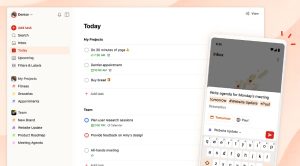
Todoist is one of the most popular task managers, known for its clean interface and powerful natural-language input. Users can quickly create tasks such as “Submit report tomorrow at 10am,” assign priorities, add labels, and track recurring work. Beyond personal productivity, Todoist also supports shared projects, comments, and productivity insights, making it suitable for small teams as well.
Best for: Personal productivity, lightweight task tracking
Strength: Speed, simplicity, and excellent cross-platform support
2. Trello
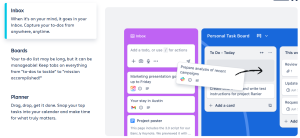
Trello uses a visual, card-based Kanban system that allows users to move tasks across boards and lists as work progresses. Its intuitive design makes it easy to understand project status at a glance. With built-in automation (Butler), templates, and integrations with tools like Slack and Google Drive, Trello is especially effective for collaborative and visual workflows.
Best for: Visual thinkers, small teams
Strength: Intuitive Kanban-style organization and ease of use
3. Asana
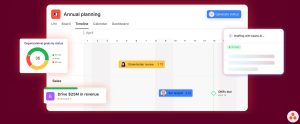
Asana is built for structured team collaboration and complex project management. It offers advanced features such as task dependencies, timelines (Gantt charts), workload management, and detailed reporting. Widely adopted by marketing, product, and operations teams, Asana provides strong visibility into progress and responsibilities across departments.
Best for: Team projects, structured workflows
Strength: Robust project planning and reporting capabilities
4. Notion
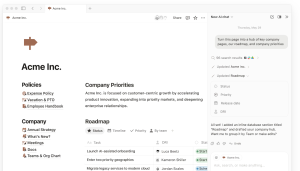
Notion combines task management with notes, databases, documentation, and wikis in a single workspace. Instead of enforcing a fixed structure, it allows users to design fully customized systems using blocks and templates. This flexibility makes Notion especially popular with startups, creators, and individuals who want tasks closely connected to knowledge and documentation.
Best for: Custom workflows, knowledge + task management
Strength: Highly flexible, all-in-one workspace
5. Microsoft To Do
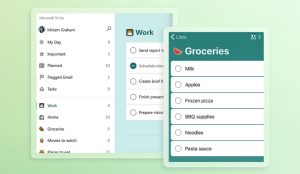
Microsoft To Do focuses on simple daily planning with features like reminders, recurring tasks, and the “My Day” view. Its strongest advantage is seamless integration with Microsoft 365 and Outlook, automatically syncing flagged emails and assigned tasks. While not designed for complex projects, it is highly effective for personal and work-related task lists within the Microsoft ecosystem.
Best for: Microsoft users, daily task planning
Strength: Deep integration with Outlook and Microsoft 365
6. Things
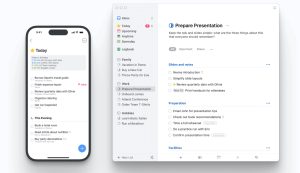
Things is a premium task manager designed exclusively for Apple users. It is built around the Getting Things Done (GTD) methodology and emphasizes clarity, focus, and thoughtful design. With features such as areas, projects, and checklists, Things excels as a personal productivity tool, though it does not support team collaboration.
Best for: Apple users, GTD methodology
Strength: Elegant design and exceptional user experience
7. ClickUp
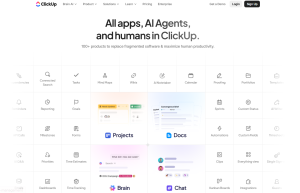
ClickUp aims to replace multiple productivity tools by combining tasks, documents, goals, dashboards, time tracking, and automation into one platform. It supports multiple task views, extensive customization, and integrations with a wide range of tools. While powerful, ClickUp can feel complex for new users, making it best suited for teams that need flexibility and scalability.
Best for: Growing teams, all-in-one productivity
Strength: Extensive customization and feature depth
8. Monday.com
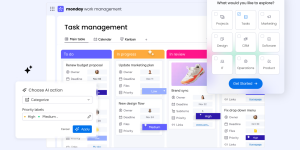
Monday.com is a work operating system designed for business teams. It offers visually rich boards, dashboards, and no-code automation to manage projects, tasks, and workflows. Popular with marketing, sales, HR, and operations teams, Monday.com emphasizes transparency, collaboration, and ease of adoption for non-technical users.
Best for: Business teams, workflow automation
Strength: Visual dashboards and powerful automation tools
9. TickTick
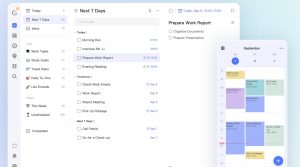
TickTick combines task management with habit tracking, calendars, Pomodoro timers, and focus analytics. This makes it particularly appealing to users who want to manage tasks and personal productivity techniques in one place. It offers a strong feature set at a competitive price, making it a popular alternative to Todoist.
Best for: Personal productivity, habit tracking
Strength: Integrated tasks, habits, and focus tools
10. Google Tasks
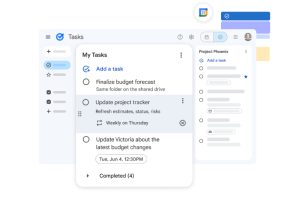
Google Tasks is a lightweight task manager built directly into Gmail and Google Calendar. Users can create tasks from emails and view deadlines alongside calendar events. While limited in advanced features, it is highly convenient for users who want simple task tracking without adopting a separate productivity platform.
Best for: Google Workspace users, simple task lists
Strength: Native integration with Gmail and Google Calendar
Material by Iva Abadjievа
Images: Todoist; Trello; Asana; Notion; Microsoft To Do; Things; ClickUp; Monday.com; TickTick; Google Tasks